MCP — Model Context Protocol Là Gì? Chuẩn Kết Nối AI Hot Nhất 2026
🔌 "USB-C của Generative AI" — đó là cách Anthropic gọi Model Context Protocol (MCP). Ra mắt cuối 2024, đến 2026 MCP đã được OpenAI, Google, GitHub, Cursor, Windsurf và hàng nghìn dự án adopt. Nếu bạn xây AI Agent hoặc tool dùng LLM, MCP là kỹ năng bắt buộc.
1) Vì Sao MCP "Nóng" 2026?
🔥 MCP đã chuyển từ "spec mới của Anthropic" thành "chuẩn industry" chỉ sau 18 tháng:
- OpenAI (Mar 2025): công bố hỗ trợ MCP trong Agents SDK
- Google (Apr 2025): Gemini hỗ trợ MCP
- GitHub Copilot, Cursor, Windsurf, Zed, Replit: đều dùng MCP cho extension AI
- 3,000+ MCP servers open-source trên GitHub (06/2026)
🚀 Tại sao mọi tool AI đều adopt MCP?
🔓 Chuẩn mở (Open Standard)
Không bị lock-in vào 1 vendor. Build MCP server một lần → dùng được với Claude, ChatGPT, Gemini, Copilot.
🧩 Plug & Play
Thêm tool mới cho AI assistant chỉ cần cài MCP server — không cần code lại agent.
📦 Hệ sinh thái khổng lồ
Cộng đồng đã build sẵn server cho Slack, Notion, GitHub, Postgres, Stripe, Linear, Jira... gần như mọi SaaS.
🔒 Bảo mật & Local-first
MCP server chạy local → data không phải gửi qua cloud. Phù hợp banking, healthcare, enterprise.
2) MCP Là Gì? Lịch Sử & Định Nghĩa
📖 Định nghĩa chính thức (Anthropic):
Model Context Protocol (MCP) là một giao thức mở chuẩn hóa cách ứng dụng cung cấp context (data, tools, prompts) cho các Large Language Model. Hãy xem MCP như "cổng USB-C của thế giới AI" — một chuẩn đồng nhất để kết nối model với mọi nguồn dữ liệu.
📅 Timeline MCP
🚀 11/2024 — Anthropic công bố MCP
Anthropic open-source spec + reference SDK (Python & TypeScript) cùng Claude Desktop là MCP client đầu tiên.
📈 Q1 2025 — Cộng đồng bùng nổ
Hơn 500 MCP server được community build trong 3 tháng. Cursor, Zed, Continue.dev tích hợp.
🤝 03/2025 — OpenAI adopt MCP
Sam Altman công bố OpenAI Agents SDK hỗ trợ MCP — đánh dấu MCP chính thức trở thành industry standard.
🌐 06/2025 — Google & Microsoft join
Gemini, Microsoft Copilot Studio đều có MCP integration. GitHub Copilot ra MCP Marketplace.
🚀 2026 — MCP 2.0 + Enterprise Push
Spec v2 với OAuth, streaming improvements, multi-tenant. Enterprise platforms (Databricks, Snowflake, Salesforce) đều có MCP server official.
3) Vấn Đề MCP Giải Quyết — "M × N" Problem
🧩 Trước MCP: Mỗi AI assistant phải tự code integration cho từng tool — tạo ra "M × N integrations" problem.
❌ Thế giới trước MCP
🔥 Bài toán M × N integrations
✅ Sau MCP: M + N
🎯 MCP giảm xuống chỉ M + N
Bài học từ LSP (Language Server Protocol)
MCP học hỏi LSP — chuẩn Microsoft đưa ra 2016 để giải bài toán "mỗi IDE phải tự code language support". Sau LSP: 1 language server (Python, Rust...) dùng được cho mọi editor (VSCode, Neovim, Sublime). MCP áp dụng đúng pattern này cho AI.
4) Kiến Trúc MCP — Client / Server / Transport
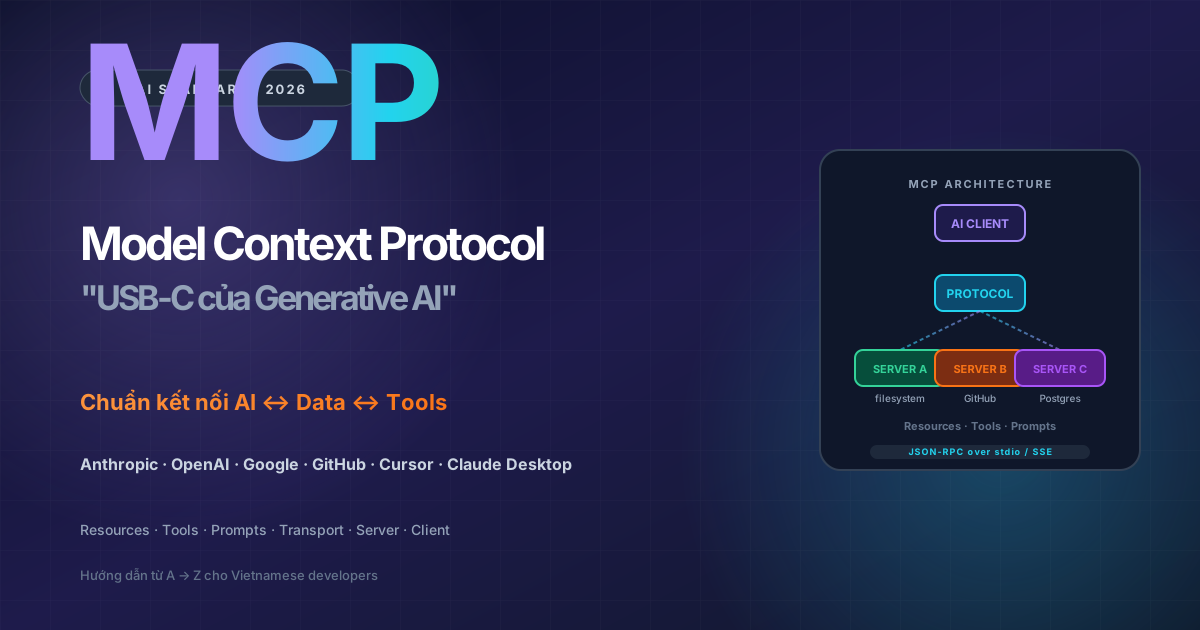
🏗️ MCP có 3 thành phần chính: Host (AI app), Client (kết nối tới server), và Server (cung cấp data/tools).
🔗 Sơ đồ kiến trúc
📦 Các thành phần chính
| Thành phần | Vai trò | Ví dụ |
|---|---|---|
| Host | Ứng dụng chứa LLM + MCP clients | Claude Desktop, Cursor, ChatGPT Desktop |
| Client | Kết nối 1:1 với 1 server, dịch protocol | Một SDK instance bên trong host |
| Server | Cung cấp resources, tools, prompts | filesystem-server, github-server, postgres-server |
| Transport | Tầng vận chuyển message | stdio (local), SSE (remote), Streamable HTTP (mới 2025) |
| Protocol | Format message (JSON-RPC 2.0) | request, response, notification |
🚚 Transport Layers
📂 stdio (Standard I/O)
Server chạy local như subprocess của host. Giao tiếp qua stdin/stdout. Use case: local tools (filesystem, git, sqlite).
🌐 SSE (Server-Sent Events)
Server chạy remote (HTTP). Use case: SaaS integrations (GitHub, Slack), nhiều user dùng chung.
⚡ Streamable HTTP (2025+)
Transport mới thay SSE, hỗ trợ bidirectional streaming + reconnect. Recommended cho production.
5) 3 Primitives — Resources, Tools, Prompts
🧱 MCP server expose 3 loại "primitive" mà client có thể consume. Đây là khái niệm core nhất bạn phải nắm.
📚 So sánh 3 primitives
| Primitive | Ai trigger | Mục đích | Ví dụ |
|---|---|---|---|
| Resources | App / User (controlled) | Cung cấp context data | File content, DB schema, API doc |
| Tools | Model (autonomous) | Thực hiện hành động | Send email, write file, query DB, call API |
| Prompts | User (explicit invoke) | Template tái sử dụng | "/code-review", "/summarize-pr", "/explain-error" |
📄 Resources — Read-only Context
Định nghĩa: Resources là data sources read-only mà server expose cho client. Client (hoặc user) chủ động kéo về để cung cấp context cho model.
Ví dụ resources phổ biến:
- File content:
file:///home/user/notes.md - Database row:
postgres://db/users/123 - Log entry:
log://service-a/2025-06-21 - Image:
screen://capture/window-1
Khi nào dùng? Khi data không thay đổi state (chỉ đọc). User control khi nào include.
🛠️ Tools — Actions for Model
Định nghĩa: Tools là functions model có thể tự gọi (autonomous) để thực hiện hành động. Đây là tương đương "function calling" nhưng chuẩn hóa qua MCP.
Ví dụ tools phổ biến:
create_file(path, content)→ tạo filequery_database(sql)→ truy vấn DBsend_slack_message(channel, text)→ gửi Slackgit_commit(message)→ commit codesearch_github_issues(repo, query)→ tìm issue
Khi nào dùng? Khi action thay đổi state hoặc cần model tự quyết định gọi.
💬 Prompts — Reusable Templates
Định nghĩa: Prompts là template được tham số hóa mà user có thể invoke (thường qua slash command "/").
Ví dụ prompts:
/code-review file=app.py→ server trả về prompt review code chuẩn/summarize-pr number=123→ server fetch PR rồi sinh prompt summary/explain-stacktrace error=...→ format stacktrace để Claude debug
Khi nào dùng? Khi muốn cung cấp workflow chuẩn cho user, ẩn complexity prompt engineering.
Mnemonic dễ nhớ
Resources = "đây là data, hãy đọc" (passive)
Tools = "AI ơi, gọi function này đi" (active)
Prompts = "user ơi, có sẵn workflow này" (template)
6) Cách MCP Hoạt Động — JSON-RPC Flow
🔄 MCP dùng JSON-RPC 2.0 — chuẩn message format đơn giản, có 3 loại message: request, response, notification.
🤝 Lifecycle 1 phiên MCP
🚀 Initialize
Client gửi initialize request → server trả capabilities (hỗ trợ tools/resources/prompts gì).
📋 Discovery
Client gọi tools/list, resources/list, prompts/list để biết server cung cấp gì.
📞 Invocation
Khi cần, client gọi tools/call, resources/read, prompts/get với arguments.
📡 Notifications
Server có thể push event (vd: notifications/resources/updated) khi data thay đổi.
🛑 Shutdown
Khi host đóng, client gửi shutdown → server cleanup resources.
📨 Ví dụ message JSON-RPC
Request: Client gọi tool
1{2 "jsonrpc": "2.0",3 "id": 42,4 "method": "tools/call",5 "params": {6 "name": "query_database",7 "arguments": {8 "sql": "SELECT name FROM users WHERE active = true LIMIT 10"9 }10 }11}Response: Server trả kết quả
1{2 "jsonrpc": "2.0",3 "id": 42,4 "result": {5 "content": [6 {7 "type": "text",8 "text": "[{\"name\":\"Huy\"},{\"name\":\"Linh\"},..."9 }10 ],11 "isError": false12 }13}7) MCP vs Function Calling Truyền Thống
🤔 Câu hỏi thường gặp: "MCP có khác gì OpenAI Function Calling đâu?"
| Tiêu chí | Function Calling (OpenAI / Anthropic SDK) | MCP |
|---|---|---|
| Phạm vi | API của 1 LLM provider | Chuẩn cross-provider |
| Định nghĩa tool | JSON schema gửi trong API call | Server-side, discover qua protocol |
| Reuse | Phải re-implement cho mỗi app | 1 server dùng cho mọi MCP client |
| Resources (data context) | Không có khái niệm | ✅ Có riêng primitive |
| Prompts (templates) | Không có khái niệm | ✅ Có riêng primitive |
| Local execution | Phải tự setup framework | ✅ stdio transport sẵn |
| Notification (push) | Không có | ✅ Server push event |
| Marketplace | Mỗi vendor riêng | ✅ MCP Registry, GitHub topics |
🎯 Tóm lại: MCP không thay thế function calling — mà là lớp chuẩn hóa cao hơn giúp function calling reusable cross-app, cross-vendor. Bên dưới, MCP server vẫn dùng function calling khi gọi LLM.
8) Top 10 MCP Servers Phổ Biến
🔥 Servers chính thức (Anthropic Reference)
| Server | Chức năng | Use case |
|---|---|---|
| filesystem | Read/write/list file local | Code editor, doc assistant |
| github | Repos, issues, PRs, search | Dev workflow, code review |
| git | Status, diff, commit, branch | Local git operations |
| postgres | Query database (read-only) | Data analyst, BI |
| sqlite | Query SQLite local | Local data exploration |
| slack | Send message, list channels | Notification, team workflow |
| puppeteer | Browser automation, screenshot | Web scraping, testing |
| memory | Long-term knowledge graph | AI memory persistent |
| fetch | HTTP fetch URL nội dung | Read web pages cho LLM |
| time | Lấy current time, timezone | Scheduling tasks |
🌟 Community Servers (3,000+ trên GitHub)
📝 Notion MCP
Đọc/ghi Notion pages, query database. Phổ biến trong personal AI assistant.
📊 Linear / Jira MCP
Project management — AI tạo issue, assign, search ticket.
💳 Stripe MCP
Tạo invoice, query payment, refund. Quan trọng cho fintech & SaaS.
📺 YouTube MCP
Lấy transcript video, search content — research workflow.
📦 AWS / GCP MCP
List resources, monitor cost. Cloud admin AI assistant.
🔍 Brave / Perplexity Search
Web search realtime cho AI — bổ sung kiến thức ngoài training data.
9) Build MCP Server Đầu Tiên
🛠️ Hands-on: xây 1 MCP server đơn giản expose 1 tool (tính tuổi từ năm sinh) và 1 resource (thông tin tác giả).
🐍 Python — MCP Server với FastMCP
Bước 1: Install SDK
1pip install mcpBước 2: Tạo server.py
1from mcp.server.fastmcp import FastMCP2from datetime import datetime34mcp = FastMCP("Demo Server")56@mcp.tool()7def calculate_age(birth_year: int) -> int:8 """Tính tuổi hiện tại dựa trên năm sinh."""9 return datetime.now().year - birth_year1011@mcp.resource("author://info")12def get_author_info() -> str:13 """Thông tin tác giả MCP server demo."""14 return "Nguyễn Quốc Huy (Rinez) — MinAI Learning Platform"1516@mcp.prompt()17def code_review_prompt(file_path: str) -> str:18 """Sinh prompt review code cho file cụ thể."""19 return f"Hãy review file {file_path} với focus: security, performance, readability."2021if __name__ == "__main__":22 mcp.run(transport="stdio")Bước 3: Đăng ký vào Claude Desktop
Edit ~/Library/Application Support/Claude/claude_desktop_config.json:
1{2 "mcpServers": {3 "demo": {4 "command": "python",5 "args": ["/path/to/server.py"]6 }7 }8}Bước 4: Restart Claude Desktop → bạn sẽ thấy icon MCP ở góc dưới input box. Gõ: "Tôi sinh năm 1995, tính tuổi của tôi" → Claude tự gọi calculate_age(1995) và trả kết quả.
📘 TypeScript — MCP Server
Cài đặt
1npm install @modelcontextprotocol/sdkTạo server.ts
1import { Server } from "@modelcontextprotocol/sdk/server/index.js";2import { StdioServerTransport } from "@modelcontextprotocol/sdk/server/stdio.js";34const server = new Server(5 { name: "demo-ts", version: "1.0.0" },6 { capabilities: { tools: {} } }7);89server.setRequestHandler("tools/list", async () => ({10 tools: [11 {12 name: "calculate_age",13 description: "Tính tuổi hiện tại",14 inputSchema: {15 type: "object",16 properties: { birthYear: { type: "number" } },17 required: ["birthYear"],18 },19 },20 ],21}));2223server.setRequestHandler("tools/call", async (req) => {24 if (req.params.name === "calculate_age") {25 const year = req.params.arguments.birthYear as number;26 return { content: [{ type: "text", text: String(new Date().getFullYear() - year) }] };27 }28 throw new Error("Unknown tool");29});3031const transport = new StdioServerTransport();32await server.connect(transport);Security best practices
MCP server có thể chạy code, đọc file, gọi API → chỉ cài server bạn tin tưởng. Kiểm tra source code trước khi cài từ community. Anthropic đang xây MCP Registry với verified servers.
10) Use Case Thực Tế Cho Developer VN
💼 5 use case áp dụng ngay
🏦 Banking / Fintech Internal Assistant
MCP server kết nối Claude với core banking, CIC, internal SOPs → AI Agent giúp nhân viên tra cứu chính sách, kiểm tra hồ sơ vay. Data ở local, không leak ra cloud.
📊 Data Analyst Co-pilot
MCP server postgres + filesystem → analyst chat với Claude/Cursor về data warehouse, sinh query SQL, vẽ chart. Replace cho Mode/Hex.
👨💻 Dev workflow tự động
GitHub + Linear + Slack MCP servers → "Tạo PR review cho ticket TASK-123, ping #engineering khi xong". Code <100 dòng config.
📝 Personal Knowledge AI
Notion + filesystem + memory MCP → cá nhân hóa Claude với notes, journal, project docs riêng. Privacy-first.
🛒 E-commerce Operations
MCP server cho Shopify/Haravan + database orders → "Tạo report doanh thu Q2, list top 10 SP best-seller" trong chat.
🎓 Edu / Training Assistant
MCP filesystem cho curriculum + LMS API → Claude trợ giảng cá nhân hóa cho từng học viên.
🎯 Cách bắt đầu cho dev VN
- Cài Claude Desktop (free, tier có hạn) hoặc dùng Cursor / Continue.dev
- Cài 3 MCP servers cơ bản: filesystem, github, fetch
- Build 1 MCP server custom đầu tiên cho use case cụ thể của bạn (vd: tra cứu CIC, query nội bộ)
- Share open-source nếu phù hợp → contribute community
11) Tương Lai MCP 2026-2028
🚀 Xu hướng đáng chú ý
🏪 MCP Registry & Marketplace
Anthropic + GitHub đang xây MCP Registry chính thức với verification, ratings, security audit. Tương tự npm cho MCP servers.
🔐 Enterprise OAuth + RBAC
Spec v2 (2026) thêm OAuth flow chuẩn, role-based access control — quan trọng để enterprise adopt.
🌐 Remote MCP Servers cloud-native
Streamable HTTP transport thay thế stdio cho production. SaaS có thể host MCP server endpoint riêng.
🧠 Multi-agent với MCP
AI Agent này invoke AI Agent khác qua MCP → ecosystem agent-to-agent. Anthropic gọi là "agent mesh".
📱 Mobile MCP clients
Claude mobile, ChatGPT mobile sẽ hỗ trợ MCP — chạy AI Agent đầy đủ trên điện thoại.
🇻🇳 MCP Việt hóa
Cộng đồng VN có thể build MCP server cho VNPay, MoMo, CIC, VNDirect... → AI assistant hiểu domain VN.
Challenges còn lại
Discovery: chưa có search engine chính thức cho MCP servers. Authentication: stdio chưa có auth, SSE/HTTP đang build OAuth. Versioning: spec đang stabilize. Performance: overhead JSON-RPC ở high-throughput use case.
12) Kết Luận & Lộ Trình Học MCP
🎯 MCP = chuẩn industry cho AI integration giai đoạn 2026-2030
🔑 Key Takeaways
- MCP = USB-C cho AI — chuẩn mở do Anthropic 2024, được OpenAI/Google/GitHub adopt 2025
- Giải bài toán M×N integrations → giảm xuống M+N nhờ chuẩn chung
- 3 primitives: Resources (data), Tools (actions), Prompts (templates)
- 2 transport chính: stdio (local) + Streamable HTTP (remote)
- 3,000+ community servers sẵn có cho gần như mọi SaaS
- Easy to build: Python & TypeScript SDK official, ~50 dòng code là có server đầu tiên
📚 Lộ trình học MCP cho dev VN
| Tuần | Mục tiêu | Resource |
|---|---|---|
| 1 | Hiểu khái niệm, cài Claude Desktop + 3 servers built-in | docs.anthropic.com/mcp |
| 2 | Build MCP server đầu tiên (Python hoặc TypeScript) | FastMCP tutorial |
| 3 | Tích hợp Postgres + custom tools cho use case riêng | github.com/modelcontextprotocol/servers |
| 4 | Deploy remote MCP server với Streamable HTTP | MCP Cloud examples |
| 5 | Đóng góp 1 MCP server cho community | GitHub topic: mcp-server |
💬 Lời khuyên cuối
Nếu bạn là developer 2026, bỏ qua MCP = bỏ qua làn sóng giống như bỏ qua REST API năm 2010. Đầu tư 1 tuần học MCP có thể tăng productivity AI workflow của bạn lên 3-5×. Bắt đầu từ Claude Desktop + 3 server built-in (filesystem, github, fetch) hôm nay.